Free AI photo generator: the 8 best free options in 2026 and their real limits
The best free AI photo generators and text to image AI tools in 2026, from Gemini and ChatGPT to Bing, Meta AI and Ideogram, with each one's real free limit.

On this page 17 sections
- The 8 best free AI photo generators at a glance
- How we tested
- 1. Gemini: the best free AI photo generator
- 2. Bing Image Creator (Microsoft)
- 3. Meta AI
- 4. ChatGPT
- 5. Ideogram: best for text in images
- 6. Leonardo: best for lots of styles
- 7. Adobe Firefly
- 8. Canva: best for turning images into designs
- Free alternatives to Grok Imagine
- What is text to image AI?
- AI image generators that take a photo as input
- 5 tips for more realistic AI photos
- Can you use free AI photos for business?
- More free creative tools
- Bottom line
The best free AI photo generator for most people is Gemini. Image generation with its Nano Banana 2 model is included without a paid plan. In our test it made a realistic photo in under 30 seconds, spelled the words on a shop sign correctly, and changed the scene when we simply asked. If you’d rather not use Google, Microsoft’s Bing Image Creator and Meta AI are free too. If you don’t want an account at all, try Perchance.
Every limit below comes from the company’s own pages, checked on November 4, 2026. Most of them change often, so we say when a company doesn’t publish a number.
Start by writing a good prompt. This builder turns your idea into one that works in every tool on this list:
AI image prompt builder
Paste it into Gemini, ChatGPT, Bing Image Creator, Meta AI or any generator below. It runs in your browser; nothing is sent anywhere.
The 8 best free AI photo generators at a glance
| Tool | What you get free | What you need | Upload a photo? | Best for |
|---|---|---|---|---|
| Gemini | Image generation with Nano Banana 2. Flexible daily limit; downloads at 1K | Google account, 13+ | Yes (18+ to edit images) | Realistic photos, text in images, quick edits |
| Bing Image Creator (Microsoft) | Free, no daily number published | Personal Microsoft account (not work or school) | Yes | A second free option alongside Gemini |
| Meta AI | Free; 4 images per prompt; can animate them | Meta AI app, meta.ai or Messenger, where available | Yes (“create image of me”) | Fun images of yourself |
| ChatGPT | “Limited image creation” on the free plan, no fixed number published | Free OpenAI account | Yes | Following long, detailed instructions |
| Ideogram | 30 credits a week | Sign in with Google, Apple or Microsoft | Not covered here | Posters, logos and text-heavy images |
| Leonardo | 150 fast tokens a day | Free account | Not covered here | Lots of styles and fine control |
| Adobe Firefly | A limited number of daily generations, on a set of models | Free Adobe account | Not covered here | People who already use Adobe Express or Photoshop |
| Canva | A small monthly AI allowance; short pauses once it runs out | Free Canva account | Not covered here | Turning the image straight into a design |
Not on the list: Grok Imagine, because free access is the most restricted of the big names (more on that below), and Perchance, which says it’s free with no sign-up and no limit, but is a small independent site, so we’ve kept it as a side option.
How we tested
We gave Gemini (Flash, the setting that uses Nano Banana 2, the free model) one prompt meant to catch the two classic AI-image problems: messy text and a fake, plastic look.
Create an image: a realistic photo of a small bakery shop window on a rainy evening. A hand-painted sign on the glass says “FRESH BREAD DAILY”. Loaves of bread on wooden shelves inside, warm light, raindrops on the glass. 16:9 landscape.
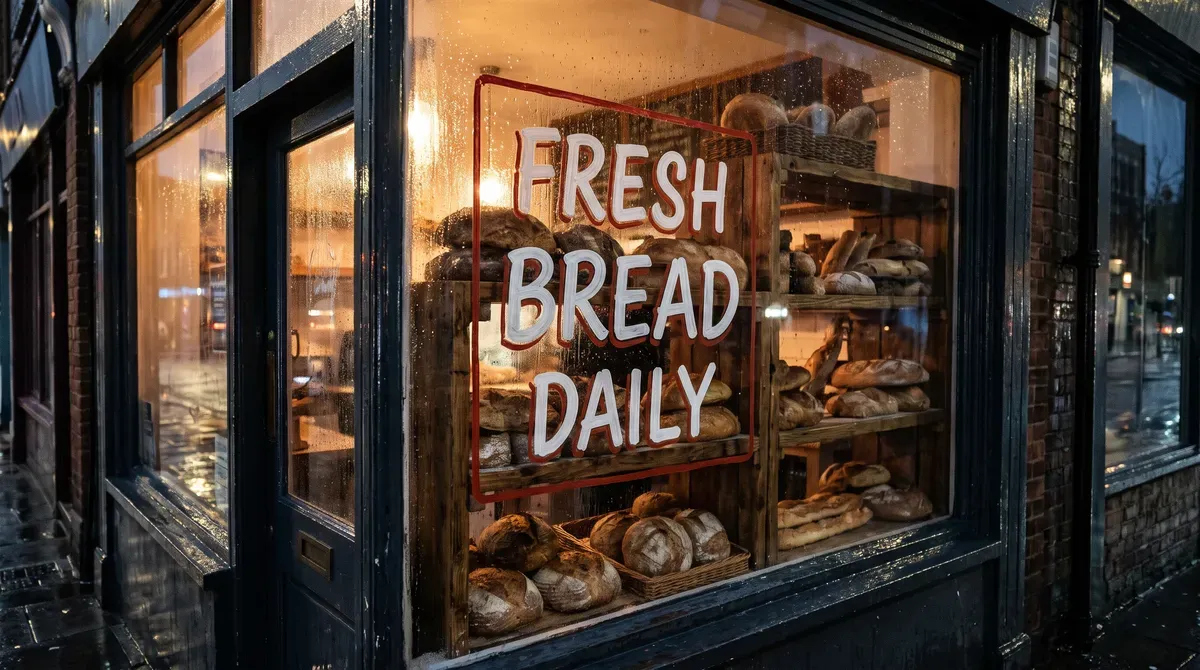
It took under 30 seconds. Then we asked for an edit in the same chat: “Edit this image: make it a sunny morning with no rain, and change the sign to say “OPEN 7 DAYS”. Keep everything else the same.“
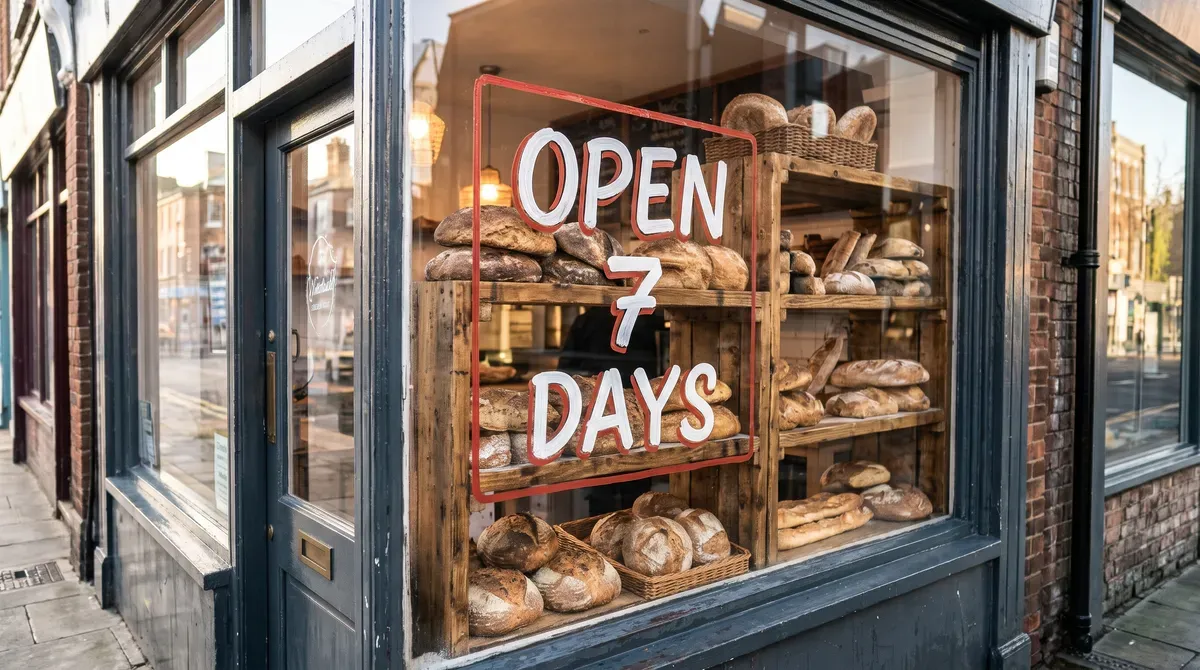
Two honest notes. We ran this on a Google AI Pro account, which uses the same Nano Banana 2 model as the free plan but downloads at 2K instead of 1K. And when we opened ChatGPT without logging in, it asked us to log in before it would create images, so we couldn’t test it the same way. For every other tool, the limits come from the company’s own pages, not from our use.
1. Gemini: the best free AI photo generator
Google’s limits page lists image generation with Nano Banana 2 as included without a Google AI plan. Google says Nano Banana 2 can keep a person or character looking the same across images, combine several reference images, make small local edits, and add text with more accurate spelling. That matched our test.
What the free plan doesn’t include:
- Nano Banana Pro. Redoing an image with the Pro model is for paid plans only.
- Full-size downloads. Free downloads are 1K; a Google AI plan gets 2K.
- A fixed number. Google now uses flexible usage limits. Gemini tells you when you’re close and when the limit refreshes, and Google says free users may be limited first when demand is high.
You need to be 13 or older (or your country’s minimum age) to generate images, and 18 or older to generate and edit images. Every Gemini image also carries Google’s invisible SynthID watermark.
How to use it: go to gemini.google.com, keep the model on Flash, and start your message with “Create an image:”. To change something, just ask in the same chat, like we did above.
2. Bing Image Creator (Microsoft)
Microsoft says Bing Image Creator is free for everyone with a personal Microsoft account. You describe the image, pick a style, and can upload your own images to personalize what you make. It doesn’t work if you’re signed in with a work or school account. Microsoft doesn’t publish a daily number, so treat it as your backup when Gemini says you’ve hit your limit.
3. Meta AI
Meta’s image generator is free in the Meta AI app, on meta.ai and in Messenger chats. Each prompt gives you four images, which you can download, change with another prompt, or turn into animated images. To put yourself in the picture, Meta’s help page says to start with “create image of me”.
The catch: Meta says its AI apps and websites aren’t available everywhere yet, and some features may not be available in your area.
4. ChatGPT
OpenAI’s free plan includes limited image creation and lets you upload images to edit them. OpenAI doesn’t publish a number. Image generation has its own usage limit, separate from text chats, and ChatGPT tells you when you hit it and when it resets. Paid plans get more image creation, up to “unlimited and faster” on the top plan.
You need a free account. ChatGPT is the strongest at following long, detailed instructions, so it’s worth having alongside Gemini. For portrait prompts, see our ChatGPT and Gemini photo prompts, and for work photos our ChatGPT headshot prompts. Holiday ideas are in our ChatGPT Christmas photo prompts.
5. Ideogram: best for text in images
Ideogram is built for images with words in them: posters, logos, social graphics. Its docs say free accounts get 30 credits a week, but only if you sign in with Google, Apple or Microsoft. Accounts made with an email and password don’t get free credits. Paid plans start at $20 a month ($15 a month billed yearly) for 2,400 credits.
6. Leonardo: best for lots of styles
Leonardo’s free plan gives you 150 fast tokens a day, and they reset daily. Tokens pay for images, videos, upscales and background removal, so one big generation uses more than a small one. It has more models and settings than the chat tools, which suits people who like to tweak.
7. Adobe Firefly
Adobe gives free users a limited number of daily generations across its AI features in Firefly, Adobe Express, Photoshop on the web and its mobile apps, on a set of models. The allowance refreshes every day. Adobe doesn’t say how many. A paid plan gives you all of its models.
8. Canva: best for turning images into designs
Canva Free includes a small monthly AI allowance. Creating an image with Canva AI counts as one of its Premium AI tools, so it uses that allowance. When you run out on the free plan, Canva doesn’t stop you. It adds short pauses between generations. Canva Pro gets 10 times the allowance. It’s the easiest choice when the image is going straight onto a poster, a post or a slide.
Free alternatives to Grok Imagine
Grok Imagine is xAI’s image and video generator. It can work from text or from a reference photo. xAI’s own page says Grok is free to try on the web and in its apps, with higher limits on paid plans. SuperGrok has since been replaced by the X Subscription; see Grok’s plans and prices, and Is Grok Imagine free? for the exact image and video limits.
On X itself, things changed in January 2026. After a global backlash over Grok being used to make sexualized deepfakes of real people, X limited Grok’s image generation and editing to paying subscribers. That’s why so many people now search for alternatives.
- For realistic photos: Gemini.
- For a second free option with no Google account: Bing Image Creator.
- For images of yourself: Meta AI.
- For text and posters: Ideogram.
Making holiday pictures? Our free AI Christmas photo generator picks cover cards and family photos, and Nano Banana Pro vs Nano Banana 2 explains which Gemini model to use.
What is text to image AI?
Text to image AI makes a new picture from a written description, called a prompt. You type “a realistic photo of a bakery window on a rainy evening”, and it creates that scene from scratch. Every tool on this list is a text to image AI. Most of them can also start from a photo you upload, which is called image to image (next section).
These tools learn from huge numbers of images paired with captions, so they link words to what things look like. That’s why the words you pick matter so much.
| Text to image | Image to image | |
|---|---|---|
| You start with | Words only | A photo plus words |
| Good for | New scenes, banners, posters, ideas | Restyling a photo, new backgrounds, putting yourself in a scene |
| Best free pick | Gemini (Ideogram for posters with lots of words) | Gemini or ChatGPT |
A good text to image prompt has five parts: the subject, what’s happening, the setting, the light, and the shot or style. Our bakery prompt above has all five. The prompt builder at the top of this page puts them in that order for you.
AI image generators that take a photo as input
Want to recreate a photo in a new style, change the background, or put yourself in a scene? These take an image as input on their free plans:
- Gemini: accepts one or more reference images and makes local edits. You must be 18 or older to generate and edit images.
- ChatGPT: the free plan lets you upload images in your prompts.
- Bing Image Creator: lets you upload your own images to personalize what you make.
- Meta AI: makes images of you (“create image of me”) and edits photos.
Grok Imagine also works from reference photos, but its free use is limited.
A prompt that works in all of them:
Recreate this image as [a watercolor painting / a 1970s film photo / a clean flat illustration]. Keep the same composition, the same objects and the same camera angle. Change only the style. No text or logos.
Only upload photos you have the right to use. When we dropped a photo into Gemini, it first asked us to confirm exactly that. Don’t edit pictures of other people without their OK. And if you’d rather turn a photo into a sketch without uploading it anywhere, our free photo to drawing converter runs in your browser.
5 tips for more realistic AI photos
- Describe it like a photographer. Say the shot (close-up, wide), the light (golden hour, overcast) and the setting. The builder above does this for you.
- Be specific about small things. “Loaves on wooden shelves” beats “bread”. Specific details are what make an image look real.
- Put exact words in quotes. Write
says "FRESH BREAD DAILY", and add “no other text” so the AI doesn’t invent extra words. - Ask for the shape you need. 16:9 for a blog banner or YouTube, 1:1 for Instagram, 9:16 for a phone story.
- Edit, don’t restart. If one thing is wrong, ask for that one change in the same chat. Starting over usually loses what was already good.
Can you use free AI photos for business?
It depends on each tool’s terms, and those change, so read them before you put an AI image in an ad, on a product or in anything you sell. A few things hold across the board:
- Don’t make images of real people without their OK, and never use AI images to deceive anyone.
- Expect hidden labels. Google marks every Gemini image with an invisible SynthID watermark that Gemini can detect later.
- Say it’s AI-made where people would care, such as news, reviews and real-estate photos.
More free creative tools
- ChatGPT and Gemini photo prompts for headshots, portraits and AI photoshoots.
- Drawing prompt generator for ideas to draw yourself, including random characters.
- Photo to drawing converter for sketches and coloring pages from your own photos.
- Our AI tools directory for more image tools.
Bottom line
Start with Gemini: it’s free with a Google account, makes realistic photos, gets text right and edits on request. Keep Bing Image Creator and Meta AI as free backups for when you hit a limit. Use Ideogram for posters and text, Leonardo for style control, and Canva when the image is going into a design. Use the prompt builder above, and check each tool’s terms before you use an image for business.
Use DeepSeek? It can’t make images itself, but it writes good prompts for these tools: see can DeepSeek generate images?. For moving pictures, see free AI video generators.
Questions people ask
What is the best free text to image AI?
For most people, Gemini. You describe the picture in words and it makes it, with realistic results and correctly spelled text. For posters with lots of words, Ideogram is the better pick. Both need a free account. Perchance works without one.
What is the best free AI photo generator?
For most people, Gemini. Image generation with Nano Banana 2 is included without a paid plan, it makes realistic photos, spells text in images correctly, and lets you edit a picture by just asking. You need a Google account.
Is there a free AI image generator with no sign-up?
Perchance's AI image generator says it's free, needs no sign-up and has no limit. The big names (Gemini, ChatGPT, Ideogram, Leonardo, Firefly, Canva) all need a free account. When we opened ChatGPT without logging in, it asked us to log in before it would create images.
Which free AI image generator lets me upload a photo?
Gemini, ChatGPT, Bing Image Creator and Meta AI all take a photo as input on their free plans. Grok Imagine does too, but its free use is limited. In Gemini you must be 18 or older to generate and edit images, and only upload photos you have the right to use.
Is Grok Imagine still free?
Partly. xAI says Grok is free to try on the web and in its apps, with higher limits on paid plans. On X itself, image generation and editing were limited to paying subscribers in January 2026 after a backlash over sexualized deepfakes. If you want free images, Gemini, Bing Image Creator and Meta AI are the closest alternatives.
How many free images can I make per day?
Most big tools no longer publish a fixed number. Gemini and ChatGPT use flexible limits and warn you when you're close. The clear exceptions are Leonardo (150 fast tokens a day) and Ideogram (30 credits a week if you sign in with Google, Apple or Microsoft).
Do free AI images have a watermark?
Many do, even when you can't see it. Google puts an invisible SynthID watermark in every Gemini image, which Gemini can detect later. Check each tool's terms before you use an AI image for business.
Sources
- Gemini Apps limits and upgrades (Google)
- Generate and edit images with Gemini Apps (Google)
- Verify AI-generated images, videos and audio (SynthID, Google)
- ChatGPT Free Tier FAQ (OpenAI Help Center)
- ChatGPT plans and pricing
- Bing Image Creator (Microsoft)
- How to generate images on the Meta AI app (Meta Help Center)
- Generate images and edit photos for free with Meta AI (Meta)
- Generate images or videos with Meta AI in chats on Messenger (Meta)
- Ideogram plans and credits (Ideogram docs)
- Leonardo.Ai pricing
- Generative credits FAQ (Adobe)
- Understanding your AI usage (Canva Help Center)
- Perchance AI image generator
- Grok (xAI)
- Elon Musk's AI bot Grok limits image generation amid deepfakes backlash (Al Jazeera, January 9, 2026)